Make the most of your leave.
Track what you've earned, used and still need to schedule.
Open LES Import & Settings and enter the leave balances and the as-of date shown on your pay statement.
Set up your Leave Compass
Four quick steps to make your calendar, leave forecasts, and Pay Tracker useful. Completed steps are checked automatically.
Your LES PDF is processed on this device; original statements are not sent to Firebase. You can return to this guide from My Account & Data.
Leave dashboard
Not set up yetAnnual leave forecast
See how your leave balance and planned time off affect your year-end total.
Leave values use HH.MM: 249.15 means 249 hours, 15 minutes. Estimates account for biweekly accruals.
Dates that matter
Watch the end of the leave year and your own planned leave.
Use annual leave over your carryover limit before the year ends.
—Checking upcoming federal and in-lieu holidays…
—How the forecast works
1. Start with the actual balances from your most recent pay statement and the date those balances were accurate.
2. Add your biweekly leave accruals through the end of the leave year.
3. Deduct annual leave taken since the balance date and future planned leave.
4. Any projected annual leave above your chosen carryover limit is marked additional leave to use.
Other leave banks & expiration dates
Independent of annual carryoverCredit hours, restored leave and time-off awards are kept separate from annual leave. Confirm individual expiration dates and balances with your LES and facility.
Upcoming accrual projection
Pay-period-based estimates| Period ending | Annual earned | Sick earned | Annual leave used / planned | Projected annual balance |
|---|---|---|---|---|
| Complete Settings to see your pay-period forecast. | ||||
Leave Activity
Record leave taken, upcoming time off, and balance corrections after your last pay statement. Use HH.MM (e.g., 1.30 means 1 hour 30 minutes).
Add a leave entry
Use HH.MM for durations (8.30 = 8h 30m); minutes must be 00–59. Add separate entries for multi-day leave.
| Date | Leave | Entry | Hours | Description | Actions |
|---|---|---|---|---|---|
| No leave entries yet. | |||||
Calendar & Shifts
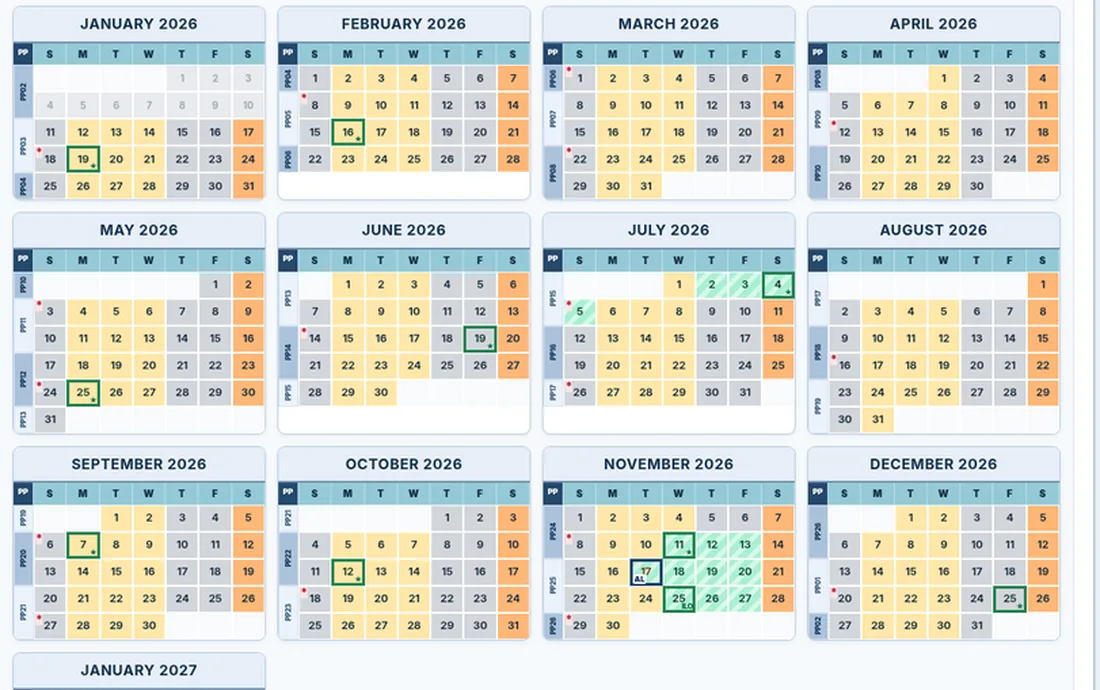
See regular shifts, planned leave and individually added overtime on your scheduled OFF days.
October 2026
Pay periods appear in the left margin beside Sunday. Labels use FAA payroll periods for 2026–2029.
PPL = paid parental leave; available only when eligibility and event dates are configured. Select a date to edit its shift or log leave. Mids belong to the FAA duty date (Saturday 2100–0700 starts Friday night); OT uses the actual start date. AL = annual leave · SL = sick leave · ILO = in-lieu holiday · RDO = regular day off.
Selected day
Choose a date on the calendar.
Shift Override
Change this date only—for swaps and other changes. Your bidded weekly schedule stays the same.
Overtime Assignment
Add or edit one-time OT assignments on an OFF day.
Select an OFF day to enter overtime.
Holiday Management
Federal holidays are always shown. Work shifts on those dates are automatically non-chargeable. Select the actual holiday to manually mark an in-lieu date.
Adjust holiday hours manually (special situations)
Normally the entire scheduled shift is non-chargeable on a federal or assigned in-lieu holiday. Only override this if your payroll designation covers fewer hours. Clear the override to restore automatic full-shift coverage.
Bidded Work Schedule
Enter your regular weekly shifts separately for each federal leave year. Manual day overrides are always applied on top of this schedule.
Annual Leave Bid Planner
Build your guaranteed leave selections, spread time off through the year, and print a visual calendar.
Click as many upcoming scheduled workdays as you want to select them. Your selections appear under Place Confirmed Bid Annual Leave below the calendar. Choose Annual Leave or Paid Parental Leave, then click Save Selected Leave to record the shifts. PPL must be inside the qualifying-event window and within your available PPL bank. You can add an optional description for each date in the popup. Click a selected date again to deselect it. You can print the plan after saving.
2027 Leave Plan
The AG Leave Compass · Federal leave-year viewPlace Confirmed Bid Leave
Select shifts above and save them as planned AL or PPL. This never submits a facility leave request. Only PPL dates in your qualifying-event window can use the PPL bank.
No shifts selected.
Other Edits
Click any date to inspect its schedule and leave records. To change the shift or holiday, open it in Monthly Schedule.
Manage Limited OT Status
When you are on Limited OT Status, the FAA cannot automatically assign overtime on your RDOs every third week. Choose your first protected week for this federal leave year, and Leave Compass will mark that week and every third Sunday–Saturday week through the end of the leave year.
Saved Vacation Blocks
Group AL days you've already saved into named trips or breaks. Grouping doesn't create another leave entry or change balances. Blocks are specific to the selected federal leave year and appear on the printed annual plan.
Maximize Time Off
Plan leave around your priorities, compare several ranked recommendations, and review every suggested date before saving. Recommendations use your schedules, RDOs, holidays, overtime, and Limited OT weeks.
2026 Use-or-Lose Situation
Based on your latest LES and saved shifts for the current federal leave year.
Plan Leave Around Your Goals
Tell Leave Compass what kind of time off you want. The free planning engine compares actual work shifts, RDOs, existing leave, holidays, and Limited OT weeks — no AI account or API needed.
Check the months that suit you best. Leave all unchecked to consider the full selected date range. For federal leave years, January can occur at both ends of the year.
Add individual dates or a date range you absolutely need off. These dates take priority over preferred months and the usual planning date range. Existing saved leave is not charged a second time; RDOs and holidays are identified separately. For combined plans, required shifts can use either AL or eligible PPL.
Whole chargeable shifts are included in every recommendation. You can review or remove a date before generating a plan.
AL and PPL are separate banks. PPL recommendations require eligibility, a PB balance, and dates within the qualifying-event window. A planning target is not a prediction of your future leave balance. For a later leave year, enter the hours you want to allocate during bidding. A full-shift selection is a suggestion, not an approved leave slot. Review and confirm dates before anything is added to your records.
Pay Tracker
Track calendar-year gross earnings, premium pay, and overtime directly from your DOT Earnings and Leave Statements.
Calendar Year Pay Overview
Gross YTD comes from the most recent imported or manually entered statement for the selected year. Category totals and OT hours use only statements whose earnings reconcile to gross.
FICA Cap Progress
Import an LESUses gross YTD and the paycheck count to estimate when gross pay will exceed the wage-base benchmark.
Gross-pay milestone, not an exact OASDI withholding cutoff. Social Security-taxable wages may differ from gross. SSA wage bases ↗
Overtime Dependence
Share of verified gross earnings from True Overtime + FLSA PremiumWhere Your Pay Comes From
Sum of current-period earnings from reconciled PDF and manual statements; FLSA Premium and True Overtime are combined as Overtime. Totals are partial until all statements are recorded and reconciled.
What Your Overtime Adds Up To
Based only on recorded, reconciled True Overtime hours (FLSA premium does not add extra hours). Just-for-fun comparisons use a 2-hour movie, 90-minute workout, 4-hour golf round, and approximately 76 hours to reach lunar orbit. They represent equivalent amounts of time, not activities you necessarily missed.
The FAA thanks you for your service.
Average Overtime per Pay Period
Based on reconciled, imported or manually completed statements only. These are averages across recorded pay periods, not a full-year average unless coverage is complete.
See averages for other premiums (optional)
Holiday, Sunday, night, CIC, OJT, and other premium earnings vary with assignments. Hours come from the LES Hours column or from Advanced → Edit statement. “Hours verified” counts pay periods where that premium was paid and the Hours column was readable. Absent premiums count as zero; unreadable hours are never guessed. FLSA hours overlap True Overtime hours and must not be added to them.
| Pay category | Avg. hours / PP | Hours verified | Avg. earnings / PP |
|---|
Compare Two Pay Periods
Compare any two recorded paychecks, whether consecutive or from different years. Select a year and pay period on each side; amounts come from the individual LES, not estimated annual pay.
Import at least two LES pay statements to compare them.
Annual Gross Pace — Paycheck by Paycheck
How your projected year-end gross has changed as each LES arrived. Each point uses that statement's gross YTD ÷ scheduled paychecks received × paychecks in the year. Missing statements aren't invented.
Import at least one pay statement to begin your on-pace history.
View exact forecast history
| Pay date | Pay period | Gross YTD | On-pace annual gross |
|---|
Early-year projections can swing substantially. Retro pay, holiday and overtime earnings, raises, and other adjustments may change the annual pace; this chart is not a guaranteed earnings forecast.
Advanced: manually add or correct a pay statement
Use this when an LES PDF will not import correctly. Transcribe the figures from its Gross Pay and EARNINGS sections. Manual entries count toward Pay Tracker only; they never update your leave balances.
Paycheck History
One row per pay date. Use Edit to correct a statement manually; replacing an existing pay date requires confirmation.
| Pay date | PP | Gross current | Reported gross YTD | OT hours | Source |
|---|
LES Import & Settings
Import an official LES, review the balances and reconciliation, and configure accrual rates, leave-year dates, and other leave banks. Leave values follow HH.MM notation.
Import Earnings & Leave Statements
One secure import tool for leave balances, Pay Tracker, or both. Select one or several DOT LES PDFs; choose the destination separately for each statement before saving. PDFs are read on this device—only extracted leave and pay numbers are stored.
Review each destination before saving.
If you select multiple LESs for leave balances, they are processed from oldest to newest. An LES older than your current snapshot is skipped for leave (but can still be imported for pay). Original PDFs are never saved to Firebase.
My Account & Data
Manage your password, keep a backup, and check that your leave is available on your devices.
Need help getting started?
Reopen the step-by-step guide for importing an LES, entering shifts, and planning leave.
Account & Security
Signed in as Not signed in
Change your password
For accounts that sign in with an email and password. Your leave records won't change.
Your leave, on all your devices
When you're signed in, your saved shifts, leave plans, and balances are available on other devices with the same account.
Leave Compass saves as you make changes. If you're offline, edits stay on this device until they can sync.
Changes need your review
Another device changed your leave records before this device could finish syncing. Download a backup before choosing which copy to keep.
Sync troubleshooting & old-account migration Optional
Most users never need these controls. They can help if a sync warning appears, or when moving data saved in an earlier version.
Removing this device's copy signs you out here. Your synced cloud data remains available when you sign in again. Don't do this while you have unsynced changes.
Backups & Data
Where should Pay Tracker history be saved?
Your original LES PDFs always stay on your device. Choose whether the extracted payroll figures sync with your Firebase account. This won't change your leave balances or schedules.
Download or restore a backup
Keep a copy of your leave history and schedule in case you ever need to restore it. The backup stays on your device until you choose to share it.
Backups include leave records, vacation blocks, and any payroll data stored on this device. Restoring replaces the current account's data. Keep backup files private.
No backup download recorded in this browser yet.
What stays private?
Your leave entries and shift schedules are linked to your own account. Other controllers can't open your records through their accounts.
LES PDFs: Read on this device, not uploaded.
Leave data: Synced to your private account so you can switch devices.
Pay data: Synced only if you choose cloud payroll storage above. Local-only mode avoids including extracted pay history in future Firestore snapshots.
Backup files: Saved wherever you choose to download them.
Check My Data
A read-only check for possible duplicate entries, dates outside known leave years, broken vacation groups, overlapping overtime, and payroll records that need review. Nothing is changed automatically.
About saving on this device Optional check
Local recovery copy
Your browser also keeps a copy in case your connection drops. It is separate from the synced account record.
Checking this browser's save settings…
Clearing browser data or using a private window may remove the local copy. Your synchronized account remains accessible when you sign in again.
Request account and data deletion Administrator-assisted
Request permanent account deletion
This is a request, not an immediate deletion. Your site administrator must verify your identity, then remove your Firestore data and Firebase sign-in. Nothing is deleted when you click Request.
Before requesting: download a private JSON backup if you need your records. Disconnect other sessions after an administrator confirms deletion. Browser copies and previously downloaded backups may need to be cleared separately.
After requesting, contact the site administrator using your normal support channel and provide the copied request details. The request is stored in your existing private account record when cloud sync succeeds; this website does not send an email or automatically notify an administrator.
Remove saved information Permanent changes
Data Management
These options change your leave records and may sync the changes to your account on other devices. Consider downloading a backup first.
Deleting leave entries keeps your balances and schedules. Deleting all leave data also clears balances and schedules. Neither action deletes your Firebase sign-in account.
Official leave references OPM resources
Leave Compass is a planning tool, not an official FAA payroll record. Use your LES and agency guidance for final balances and entitlements. Leave values use HH.MM as hours and minutes.